Resource Pack

Resource Packs are add-on files which allow players to customize the game's sprites, musics, sound effects and translations.
Installing a Resource Pack
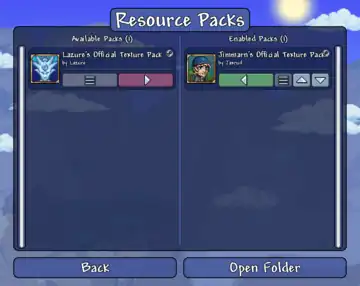
Resource Packs can be installed by being placed in the ResourcePacks folder. It can be accessed by clicking the "Open Folder" option in the Resource Packs menu in-game. This folder is generated when the game is launched. The file directories of the folder are:
- On Windows Vista and later,
%USERPROFILE%\Documents\My Games\Terraria\ResourcePacks- On Windows XP,
%USERPROFILE%\My Documents\My Games\Terraria\ResourcePacks
- On Windows XP,
- On Mac, open Finder and press "Go" on the top. Then press "Go to folder...". Type in
~/Library/Application Support/Terraria/ResourcePacks - On Linux,
$XDG_DATA_HOME/Terraria/ResourcePacks- This is typically
~/.local/share/Terraria
- This is typically
If the game is purchased on  Steam, Resource Packs can also be downloaded from the Steam Workshop, where they will be installed and updated automatically. Resource Packs downloaded from the Steam Workshop are not stored in the
 ResourcePacks folder, instead they are stored in folders named with the pack's Workshop ID in Steam's library folder. Default file directories are:
- On
 Windows:
 C:\Program files (x86)\Steam\steamapps\workshop\content\105600\<Workshop ID>
Installed Resource Packs can be enabled from the Workshop Hub or by selecting the "Resource Packs" option in the main menu, where they can be moved between "Available Packs" and "Enabled Packs".
Resource Packs installed via the Steam Workshop can also be directly used in tModLoader.
Creating a Resource Pack
Contents
Resource Packs require a pack.json file; otherwise, it will not be recognized by the game. It may optionally include an icon.png file for display in the Resource Packs menu. A valid pack.json file will look like the following:
{
	"Name": "Pack Name",
	"Author": "Author",
	"Description": "Place a brief description of your pack here, line breaks can be input with \n",
	"Version": {
		"major": 1,
		"minor": 0
	}
}
Example folder structure
Pack Nameicon.png (optional)pack.jsonContentImagesAcc_Back_1.png
Localizationen-US_Content.json
MusicMusic_77.ogg
SoundsPlayer_Killed.xnb
Images
Images are placed inside the Content/Images folder of the Resource Pack. They must share the same file name (albeit with a png extension) and canvas dimensions as the default images. The default Terraria images can be located here:
- On Windows Steam version,
C:\Program Files (x86)\Steam\steamapps\common\Terraria\Content\Images. - On Linux Steam Version,
~/.steam/steam/steamapps/common/Terraria/Content/Images - On macOS Steam version,
Library/'Application Support'/Steam/steamapps/common/Terraria/Terraria.app/Contents/MacOS/Content/Images. - On GOG version,
C:\GOG Games\Terraria\Content\Images.- Tip for Mac users: To open and view the contents of Terraria.app, right click and select "Show Package Contents"
These default images are stored with the xnb file extension. TConvert can be used to extract the default xnb images as png files for viewing, editing, and saving.
Music
Music files are placed inside the Content/Music folder of the Resource Pack. They can be in either wav, mp3 or ogg format.
|
Sounds
Sound files are placed inside the Content/Sounds folder of the Resource Pack. They should be in xnb format.
Localization
Localization files are placed inside the Content/Localization folder of the Resource Pack. They can be in either a csv or json format.
Notes

- If there is no
icon.pngincluded in a Resource Pack, it will use a default placeholder icon instead.
See also
- The Ultimate Guide To Content Creation And Use For The Terraria Workshop (March 29, 2021), an in-depth guide on creating Resource Packs by Leinfors.
History
- Desktop 1.4.2.1:
- Fixed an issue where MP3s used for replacing Music tracks would not loop.
- Fixed an issue where replaced Music tracks would be significantly louder than normal tracks.
- Fixed an issue where replacing Music tracks did not work on Mac (and possibly Linux as well, unconfirmed).
- Fixed an issue that prevented the Title Bar messages from being changed by Resource Packs.
- Fixed a loading issue with XNB assets in Resource Packs that prevented them from working properly.
- Desktop 1.4.2:
- Renamed to Resource Packs.
- Added Steam Workshop integration, allowing the downloading and sharing of Resource Packs via Steam.
- Expanded functionality to include language and music replacement.
- Desktop 1.4.0.3: Fixed a bug where Texture Packs would not work on tiles without a game restart.
- Desktop 1.4.0.1: Introduced officially as Texture Packs and can now be accessed via an option in the main menu.
- Desktop 1.3.4.2: Introduced as an experimental feature.